Built for NZ Trades & Service Businesses

Track Your Crew, Jobs, and Hours — From Any Site

GPS time tracking, job costing, work photos, duty logging, and one-click payroll export. Get your crew clocking in today.

No credit card required Set up in 2 minutes Works on any phone Cancel anytime
Construction site worker Builder on scaffolding Plumber working
30s
Average clock-in time
GPS
Site location tracking
5
Payroll export formats
PWA
Works on any phone
30
Day free trial

Everything Your Trade Business Needs

From the building site to the office — track crew hours, assign jobs, capture work photos, and get data straight into payroll.

One-Tap Clock In & Out

Crew clocks in from their phone on site with a single tap. GPS location is captured automatically so you know who's where.

Job & Site Tracking

Create jobs for each site or client. Track hours per job and know exactly where labour costs are going. Staff select their job when clocking in.

Duty & Task Logging

Staff log what they're doing — framing, wiring, plumbing. Switch duties as the work changes. You see it all in real time.

Job Photos & Notes

Crew take photos of work in progress — snap directly from their phone camera. Add notes about what was done. It all flows into job reports.

GPS Location Map

See where your crew clocked in across all sites on an interactive map. Know who's on which job without making a phone call.

PDF Reports & Payroll Export

Professional PDF timesheets and job reports with work photos. One-click CSV export to Xero, MYOB, iPayroll, Smartly, or Excel.

Leave Management

Staff request leave online. Managers approve with one click. Leave is auto-included in payroll exports — no manual entry.

Works on Any Device

Installs as a PWA from the browser — no app store. Works on iPhone, Android, tablets, and desktops. Your crew is clocking in within minutes.

Pre-Start Safety Checklists

Create equipment and safety checklists for your crew. Staff complete them on site with text answers and photos before starting work. PDF reports for compliance.

Job Scheduling

Schedule your crew to jobs for specific dates with addresses and contact details. Staff see their daily assignments with tap-to-navigate maps and one-tap calling.

Fully Customisable

Turn jobs on, duties on, or both — whatever suits your business. Each tenant is independently configured to match how your team works.

NEW FEATURE

Document Every Job With Photos & Notes

Your crew can snap photos directly from their phone at any time during a job — not just when switching. Photos are resized automatically to save storage and appear in your job reports.

  • Take photos or upload from gallery — up to 5 at a time
  • Add notes about what was completed or any issues
  • Photos included in professional PDF job reports
  • Managers review photos in daily overview and job detail
  • Tenant-isolated — each business only sees their own data
Try It Free
Construction site progress Tradesman at work Construction site progress
NEW FEATURE

Pre-Start Safety & Equipment Checklists

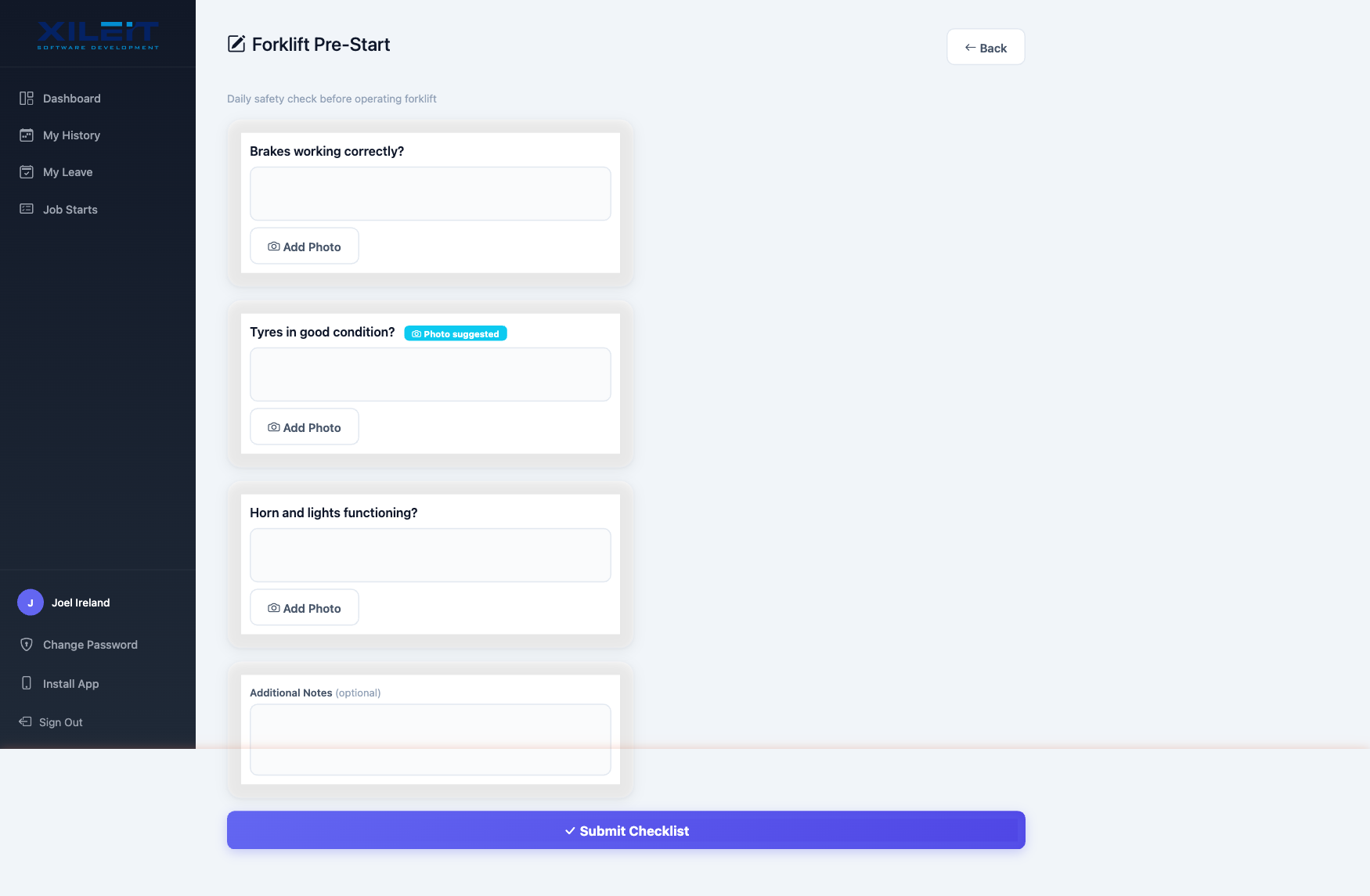
Create custom checklists for forklifts, scaffolding, vehicles, or any equipment your crew operates. Staff fill them out on site with text answers and photo evidence — before starting work.

  • Managers create checklists with custom questions
  • Staff complete on site with text answers & photos
  • Submissions logged with user, date, and notes
  • PDF checklist reports for compliance & audits
  • Enable per tenant — only when you need it
Try It Free
Pre-start checklist form
NEW FEATURE

Schedule Your Crew to Jobs & Sites

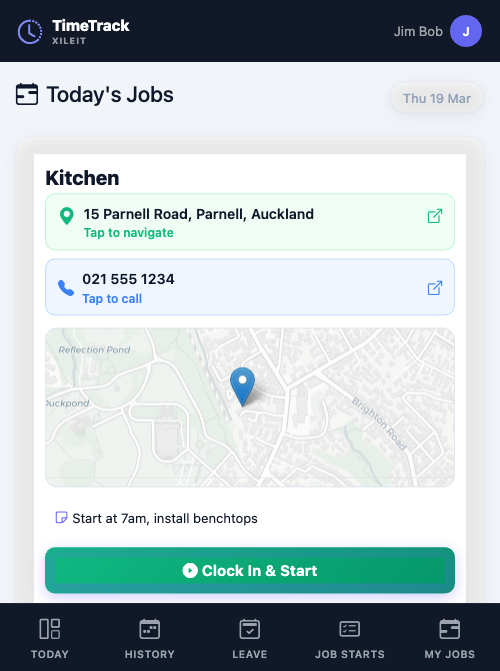
Managers assign staff to jobs for specific dates with addresses, phone numbers, and notes. Your crew sees their daily schedule with a map preview and one-tap navigation to the job site.

  • Weekly schedule view — assign users to jobs by date
  • Job addresses with tap-to-navigate maps on mobile
  • Contact numbers with tap-to-call
  • "Today's Jobs" dashboard banner for staff
  • One-tap clock in directly from scheduled job
Try It Free
Today's Jobs mobile view with map

Up and Running in Minutes

No complex setup, no downloads, no training manuals. Your crew will be tracking time on day one.

1

Sign Up in Seconds

Start your free 30-day trial — pick your URL, create your admin account, and you're in. No credit card needed.

2

Invite Your Crew

Staff get a welcome email with login details. They sign in from any phone — works as a PWA, no app store needed.

3

Track, Photo & Export

Crew clocks in, selects their job, takes photos of work. You get reports, photos, and payroll-ready CSV at the end of each pay run.

Simple, Transparent Pricing

All plans include every feature. No hidden fees. No per-feature add-ons. Just pick the plan that fits your team size.

Starter
1 – 5 users
$79
NZD per month
 
  • All features included
  • GPS time tracking
  • Job photos & notes
  • Payroll CSV export
  • PDF reports
  • Email support
Start Free Trial
From $15.80/user/month
Business
16 – 50 users
$279
NZD per month
 
  • Everything in Professional
  • Up to 50 staff accounts
  • Multiple manager accounts
  • Advanced job costing
  • Photo documentation
  • Phone & email support
Start Free Trial
From $5.58/user/month
Enterprise
50+ users
Let's Talk
Custom pricing
 
  • Everything in Business
  • Unlimited users
  • Custom onboarding
  • Dedicated account manager
  • Custom integrations
  • SLA & premium support
Contact Us
Volume pricing available

All plans include a 30-day free trial. No credit card required. Prices in NZD, GST exclusive.

Ready to stop guessing where your crew is?

Join trade businesses across New Zealand who track time, jobs, and costs with TimeTrack.

Start Your Free Trial

Export Directly to Your Payroll

One-click CSV export in the exact format your payroll system expects. No manual re-entry, no mistakes.

Xero Payroll
MYOB PayGlobal
iPayroll
Smartly
CSV / Excel

Built for Trade & Service Businesses

Whether you've got 5 tradies or 50, TimeTrack is built for teams that work across multiple sites and jobs.

Builders
Plumbers
Electricians
Landscapers
Painters
HVAC
Maintenance
Contractors

Built for Site Managers & Business Owners

Powerful oversight tools so you always know what's happening across your crew and your jobs.

Manager Dashboard

KPIs, charts, and staff status at a glance. See who's working now, hours this week, and active jobs — all on one screen.

Daily Overview with Photos

See every crew member's status, their notes, and work photos — all inline. Review job progress without leaving your desk.

Job Reports with Photo Evidence

Generate professional PDF job sheets with hours, notes, and work photos. Share with clients or keep on file for compliance.

Start Your 30-Day Free Trial

Full access to every feature. No credit card. No obligation. Set up your team and start tracking in minutes.

.timetrack.nz
Letters, numbers, and hyphens only. This will be your login URL.

No credit card required. 30 days full access. Cancel anytime.